
WooCommerce pre-orders with deposits let you sell a product before it is ready, collect part of the payment now, and bill the rest when it ships. Core WooCommerce cannot do this on its own, so you need a pre-order plugin that supports deposits. This guide walks through a complete setup with ThePlugBase’s Preorders for WooCommerce, from the first deposit setting to a tested release day, plus the mistakes that cost stores money.
The short version for WooCommerce pre-orders with deposits: set a global deposit, mark the product as a pre-order with a release date, choose a pricing mode, cap the units you can actually supply, test the full journey, and on release day the plugin invoices the balance with a secure payment link. It also works with WooCommerce HPOS.
What WooCommerce can and can’t do on its own
Core WooCommerce supports backorders: a customer can buy an out-of-stock item. It has no release date, no deposit, and no way to collect a remaining balance later. Stores that rely on backorders end up with workarounds such as manual invoices, edited prices and spreadsheets of who owes what.
A proper setup for WooCommerce pre-orders with deposits adds three things: a release date, a deposit at checkout, and a reliable way to collect the balance. Get those right and you can launch limited drops, made-to-order items and seasonal stock without carrying the full risk or asking customers to pay everything upfront.
How a deposit pre-order works
Customer reserves → pays the deposit now → price is locked → you release the product → a balance order and payment link are emailed → customer pays → you ship
Here is a worked example with a limited-edition keyboard. The figures are illustrative.
| Line | Amount |
|---|---|
| Regular price | $280.00 |
| Pre-order price (10% early-bird discount) | $252.00 |
| Deposit due today (30%) | $75.60 |
| Balance due on release | $176.40 |
The customer pays $75.60 at checkout. When the keyboard is released, the remaining $176.40 is invoiced to them. You get cash flow during the wait, and the customer has a clear picture of what they owe and when.
What you need before you start
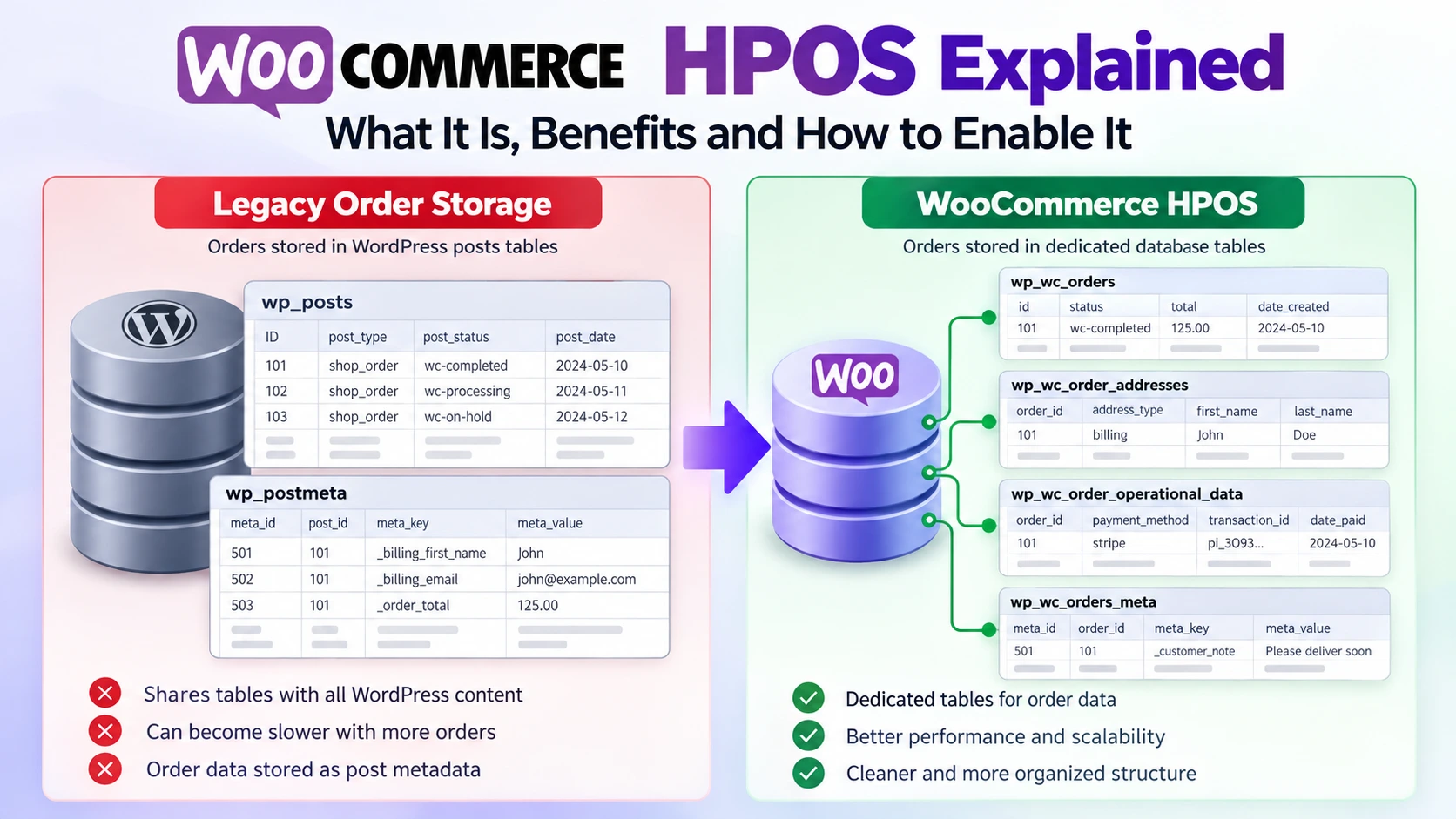
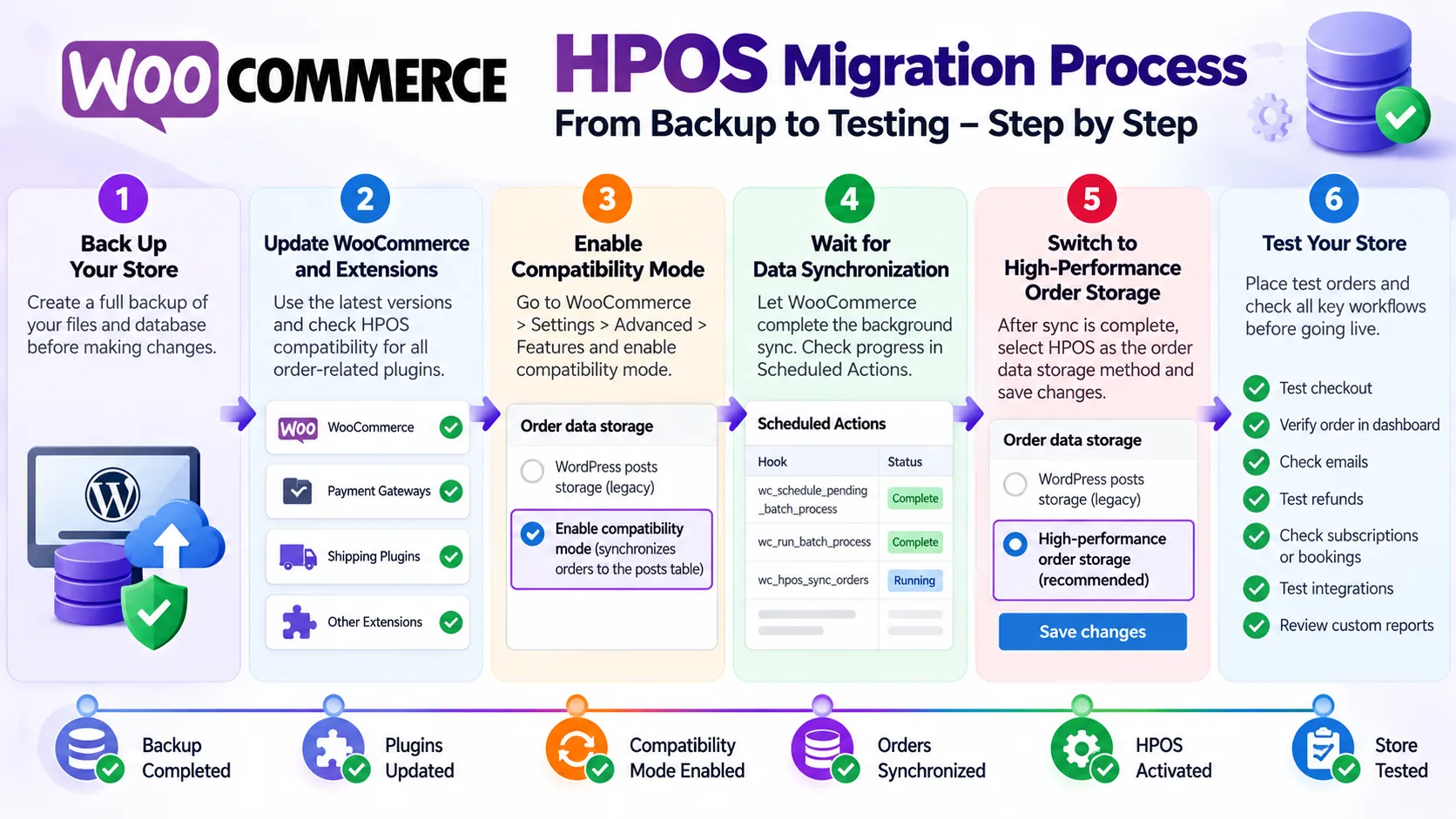
- A WooCommerce store. New installs from WooCommerce 8.2 onward use High-Performance Order Storage (HPOS) by default, and Preorders for WooCommerce is WooCommerce HPOS compatible. WooCommerce’s HPOS documentation explains where the setting lives under WooCommerce > Settings > Advanced > Features. New to the platform? Start with ThePlugBase’s guide to what WooCommerce is and how it works with WordPress.
- A pre-order plugin that supports WooCommerce pre-orders with deposits. This guide uses Preorders for WooCommerce, ThePlugBase’s own plugin.
- A payment gateway you have already tested with a normal order.
- A product with a realistic release date, a price, and a plan for how many units you can supply.
- Written terms covering the deposit, the balance due date and cancellations.
Step 1: Install and activate the plugin
In WordPress, go to Plugins > Add New Plugin > Upload Plugin, upload the plugin ZIP, then install and activate it. Enter your license details if prompted. The plugin works with both simple and variable products, so you can pre-sell a single item or a product with several options. It is compatible with WooCommerce HPOS, so it works with the default order storage on new stores.
Step 2: Set a global deposit default
Go to WooCommerce > Settings > Pre-Orders and find the Deposit section. Choose either a fixed amount, such as $50, or a percentage of the product price, such as 30%. This default applies to every pre-order product unless you override it.
A percentage is usually the better starting point because it scales with your prices. A 30% deposit is $30 on a $100 product and $150 on a $500 product, so you do not have to touch individual products when prices change.
Step 3: Turn a product into a pre-order
Open the product you want to pre-sell, find the Pre-Order tab in the Product data panel, and enable pre-orders for it. Set the release date there.
If you do not have a date yet, use the plugin’s coming-soon mode, which shows a fallback message instead of a countdown, and add the date once it is confirmed. Enabling a pre-order works the same on stores that use WooCommerce HPOS.
Step 4: Choose a pre-order pricing mode
You decide whether pre-orders cost the same as the regular price, more, or less. The plugin offers five modes:
| Mode | Example |
|---|---|
| Specific fixed price | Pre-order at $199, whatever the regular price is |
| Fixed increase | Add a $20 pre-order fee |
| Percentage increase | Charge 15% more than the regular price |
| Fixed discount | Take $30 off for early buyers |
| Percentage discount | Offer a 10% early-bird discount |
The original price can be shown crossed out using WooCommerce’s normal sale formatting, so customers can see what they are saving. Discounts reward early buyers on launches and limited drops. Increases can make sense for made-to-order or custom work where you carry extra setup cost.
Step 5: Override the deposit and cap your units
On the same Pre-Order tab, you can replace the global deposit with a product-specific one. Use a larger deposit on high-value items and a smaller one, or none, where a deposit is not worth the complexity.
Then enter your incoming stock, the number of units you expect. The plugin caps pre-orders at that number, shows an “Only X units left to pre-order” notice as you approach it, and uses database-level locking so two customers cannot claim the last unit at the same moment. If you want a buffer for damaged or cancelled units, enter slightly fewer than you expect to receive.

Step 6: Make the offer clear to customers
Once the money logic works, make the page easy to understand. The plugin adds a live countdown to the release date, customizable badges on the product image, and per-product button text, so you can change “Add to cart” to something like “Reserve now.” You can also restrict pre-ordering to certain user roles and decide how mixed carts and coupons behave.
Add a plain-language note to the product description. For example:
Available for pre-order: Reserve this product with a 30% deposit today. We will email you a secure payment link for the remaining balance when it is released. We currently expect to ship in November and will tell you if that changes.
Change the wording to match your real terms, including whether the deposit is refundable.
Step 7: Test the whole journey before launch
Use your gateway’s test mode and run a full pre-order through your WooCommerce pre-orders with deposits setup. Repeat it for each variation and for quantities above one. If your store uses WooCommerce HPOS, run the test with it enabled.
| Check | What to confirm |
|---|---|
| Product page | Pre-order label, release date, countdown and deposit terms are visible |
| Cart and checkout | The amount charged now matches the deposit you set |
| Order confirmation email | It states the deposit paid and the release date |
| Order in WooCommerce | Payment status and pre-order details are correct |
| Release | The release action works and stock is added once |
| Balance email | The payment link arrives, lands in the inbox, and works |
| Balance payment | Paying the link completes the order |
| Cancellation and refund | The process matches your published terms |
What happens on release day
When the product is ready, you release it from the plugin’s upcoming-releases view, which shows stock, units pre-ordered and the outstanding balance, with a release action for each product. Incoming stock is added to your live inventory, and a release journal makes sure it is never added twice if the server crashes mid-release.
The plugin then generates a normal WooCommerce order for each customer’s remaining balance and emails them a secure payment link. If that email fails to deliver, the plugin retries, and you can resend it manually from the order screen. The plugin can also email you a reminder a set number of days before a release. On stores with WooCommerce HPOS enabled, these balance orders are saved in the dedicated order tables.
One point to communicate clearly: the balance is invoiced with a payment link, and the customer pays it through your normal gateway. Do not promise customers an automatic card charge. Tell them in the product description and the confirmation email that a payment link is coming.
Pre-orders for variable products
If you sell one product in several versions, each variation can have its own release date, deposit, pricing mode and stock cap, independent of the parent product and the other variations. For example, a product offered in three colors can ship in three waves, each with its own countdown, and the date, deposit and timer update on the page as the customer switches variation. Variations work the same way on stores that use WooCommerce HPOS.
Price locking and taxes
The pre-order price is locked when the customer adds the product to the cart. If you change the price later, existing pre-orders keep the price the customer agreed to.
Deposits and balances are also recorded at the original tax rates, so a balance invoiced months later reflects the tax that applied when the order was placed. Have your accountant review how this fits your tax setup, especially if rates may change before release. Locked prices and tax rates behave the same with WooCommerce HPOS enabled.
Track what is committed and what is owed
A program of WooCommerce pre-orders with deposits is cash you have not fully collected yet, so you need to see it. The plugin’s analytics dashboard shows 12 months of collected deposits against outstanding balances, active pre-order units and customer counts, and the releases coming up next. Check it before each release so you know how much balance you expect to invoice.
Six mistakes to avoid
- A vague release date. Give an estimated window if the date is not firm, and update the product page and email customers when it changes.
- Not explaining the balance. Customers should know what they pay now, what they owe later and how they will be asked to pay it.
- Overselling. Cap pre-orders at the units you can actually supply.
- Promising automatic charges. The balance is a payment link, so set that expectation up front.
- Skipping refund and cancellation terms. Publish them, make sure your real process matches, and have a professional check them against the consumer rules in your country and your payment provider’s policy.
- Never checking the emails. The balance email is what collects your money, so confirm it reaches the inbox and not the spam folder during testing.
FAQ
Can WooCommerce take pre-orders with deposits without a plugin? No. Core WooCommerce offers backorders only, with no release date, deposit or balance collection. You need a pre-order plugin that supports deposits.
Is the remaining balance charged automatically? The plugin generates a WooCommerce order for the remaining balance and emails the customer a secure payment link. The customer pays it through your normal gateway, so tell them to expect the email.
Should the deposit be a percentage or a fixed amount? Either works. A percentage scales with your prices, while a fixed amount is easier to explain when products cost about the same. You can set a global default and override it per product.
Can different variations have different release dates? Yes. Each variation can have its own release date, deposit, pricing mode and stock cap.
Does it work with WooCommerce HPOS? Yes. The plugin is compatible with WooCommerce HPOS (High-Performance Order Storage), which is the default for new stores from WooCommerce 8.2.
What if my release date changes? Update the date in the product’s Pre-Order tab, email your customers with the new estimate, and be ready to handle cancellation requests under the terms you published.
Related guides
- Can I migrate my service business to booking software? covers deposits and prepayments for appointment-based businesses.
- WooCommerce HPOS explained explains what High-Performance Order Storage is and why to enable it.
Final thoughts
A reliable setup for WooCommerce pre-orders with deposits is not a button. It is a deposit rule customers understand, a release date you can stand behind, a cap on units, and a balance process you have tested end to end. Set those up, run one full test order, and you can launch limited drops and made-to-order products without carrying all the risk. Check that your setup works with WooCommerce HPOS too.
Preorders for WooCommerce is ThePlugBase’s own plugin. It starts at $10 a month for one site and includes a 30-day money-back guarantee, so you can test the deposit and balance flow on your own store before committing.
See Preorders for WooCommerce

